1  Introduction to R and RStudio

R Basics for Biostatistics

Author

Biostatistics Teaching Team

Published

June 1, 2026

1.1 Learning Objectives

After this session, students will be able to:

Know Understand Do
Assignment operator <- R stores data in objects that can be inspected, subsetted, and visualized Load a dataset with read.delim()
Data types (numeric, character, factor, data.frame) The same object can be explored in different ways Inspect data structure with str() and summary()
Basic functions: head(), str(), summary() Factors represent categorical variables used in statistical analysis Create basic visualizations with ggplot2
R packages and how to load them (library()) Different data types require different visualization approaches Subset data using $, [ ], and dplyr::filter()

1.2 Getting to Know RStudio

RStudio is an Integrated Development Environment (IDE) for R. When you open RStudio, you will see four panels:

Panel Location Function
Console Bottom left Where R executes code and displays output
Source Editor Top left Where you write and save scripts (.R files)
Environment Top right Shows objects in R memory
Files/Plots/Packages/Help Bottom right Tabs for file navigation, viewing plots, managing packages, and documentation

Think-aloud (I Do): “I open RStudio and see four panels. The panels I use most often are the Console for running code and the Source Editor for writing longer scripts. When I run code in the Console, the objects I create appear in the Environment panel.”

1.3 Objects and Assignment

In R, we store data in objects using the assignment operator <-:

# Create an object named 'x' containing the number 5
x <- 5

# Create an object named 'name' containing text
name <- "BISB211203"

# Create an object named 'numbers' containing a sequence
numbers <- c(1, 2, 3, 4, 5)

# View the contents of objects
x
[1] 5
name
[1] "BISB211203"
numbers
[1] 1 2 3 4 5

Why <- instead of =? Both can be used, but <- is the R convention. This makes code easier to read and consistent with code written by the R community.

Self-explanation prompts:
1. Why do we need to store data in objects? What’s the difference between typing 5 + 3 directly vs x <- 5; x + 3?
2. What happens if we run x <- 10 after previously setting x <- 5?

1.4 Basic Data Types

R has several data types that are important to know:

# Numeric (numbers)
length <- c(12.5, 13.2, 11.8, 14.0)
class(length)  # "numeric"
[1] "numeric"
# Character (text)
species <- c("setosa", "versicolor", "virginica")
class(species)  # "character"
[1] "character"
# Factor (categories)
# Important for categorical data in statistics
group <- factor(c("A", "B", "A", "C", "B"))
class(group)  # "factor"
[1] "factor"
# Logical (TRUE/FALSE)
result <- c(TRUE, FALSE, TRUE)
class(result)  # "logical"
[1] "logical"

Why are factors important? In statistics, factors are used for categorical variables (species type, treatment, soil type). R treats factors differently from character — factors have levels (category levels) that are used in analysis.

1.5 Loading and Inspecting Data

1.5.1 Reading Files

# Read a TSV file
iris_data <- read.delim("assets/data/iris_dataset.tsv")

1.5.2 Inspecting Data Structure

# View the first 6 rows
head(iris_data)
  sepal.length sepal.width petal.length petal.width       class
1          5.1         3.5          1.4         0.2 Iris-setosa
2          4.9         3.0          1.4         0.2 Iris-setosa
3          4.7         3.2          1.3         0.2 Iris-setosa
4          4.6         3.1          1.5         0.2 Iris-setosa
5          5.0         3.6          1.4         0.2 Iris-setosa
6          5.4         3.9          1.7         0.4 Iris-setosa
# View the complete data structure
str(iris_data)
'data.frame':   150 obs. of  5 variables:
 $ sepal.length: num  5.1 4.9 4.7 4.6 5 5.4 4.6 5 4.4 4.9 ...
 $ sepal.width : num  3.5 3 3.2 3.1 3.6 3.9 3.4 3.4 2.9 3.1 ...
 $ petal.length: num  1.4 1.4 1.3 1.5 1.4 1.7 1.4 1.5 1.4 1.5 ...
 $ petal.width : num  0.2 0.2 0.2 0.2 0.2 0.4 0.3 0.2 0.2 0.1 ...
 $ class       : chr  "Iris-setosa" "Iris-setosa" "Iris-setosa" "Iris-setosa" ...
# View statistical summary
summary(iris_data)
  sepal.length    sepal.width     petal.length    petal.width   
 Min.   :4.300   Min.   :2.000   Min.   :1.000   Min.   :0.100  
 1st Qu.:5.100   1st Qu.:2.800   1st Qu.:1.600   1st Qu.:0.300  
 Median :5.800   Median :3.000   Median :4.350   Median :1.300  
 Mean   :5.843   Mean   :3.054   Mean   :3.759   Mean   :1.199  
 3rd Qu.:6.400   3rd Qu.:3.300   3rd Qu.:5.100   3rd Qu.:1.800  
 Max.   :7.900   Max.   :4.400   Max.   :6.900   Max.   :2.500  
       class    
 Length   :150  
 N.unique :  3  
 N.blank  :  0  
 Min.nchar: 11  
 Max.nchar: 15  
                

Think-aloud (I Do): “I run str(iris_data) and see that this data has 150 observations and 5 variables. The ‘sepal length’ variable is numeric (numbers), and ‘class’ is a factor (categories). This is important because I will use different data types for different analyses.”

1.5.3 Hinge Question

Before continuing, try answering: You run str(student_data) and see the output: Factor w/ 3 levels "A","B","C": 1 1 2 3 2 1. What does “Factor w/ 3 levels” mean?

  1. The data has 3 rows
  2. This column contains 3 categories (categorical variable)
  3. There are 3 columns in the dataset
  4. The values are sorted 1, 2, 3

Answer: B. This is a categorical variable with 3 category levels.

1.6 Data Subsetting

Subsetting means taking a portion of data from a dataset:

# Extract a specific column using $
iris_data$`sepal.length`
  [1] 5.1 4.9 4.7 4.6 5.0 5.4 4.6 5.0 4.4 4.9 5.4 4.8 4.8 4.3 5.8 5.7 5.4 5.1
 [19] 5.7 5.1 5.4 5.1 4.6 5.1 4.8 5.0 5.0 5.2 5.2 4.7 4.8 5.4 5.2 5.5 4.9 5.0
 [37] 5.5 4.9 4.4 5.1 5.0 4.5 4.4 5.0 5.1 4.8 5.1 4.6 5.3 5.0 7.0 6.4 6.9 5.5
 [55] 6.5 5.7 6.3 4.9 6.6 5.2 5.0 5.9 6.0 6.1 5.6 6.7 5.6 5.8 6.2 5.6 5.9 6.1
 [73] 6.3 6.1 6.4 6.6 6.8 6.7 6.0 5.7 5.5 5.5 5.8 6.0 5.4 6.0 6.7 6.3 5.6 5.5
 [91] 5.5 6.1 5.8 5.0 5.6 5.7 5.7 6.2 5.1 5.7 6.3 5.8 7.1 6.3 6.5 7.6 4.9 7.3
[109] 6.7 7.2 6.5 6.4 6.8 5.7 5.8 6.4 6.5 7.7 7.7 6.0 6.9 5.6 7.7 6.3 6.7 7.2
[127] 6.2 6.1 6.4 7.2 7.4 7.9 6.4 6.3 6.1 7.7 6.3 6.4 6.0 6.9 6.7 6.9 5.8 6.8
[145] 6.7 6.7 6.3 6.5 6.2 5.9
# Extract specific rows using [ ]
iris_data[1:5, ]  # First 5 rows, all columns
  sepal.length sepal.width petal.length petal.width       class
1          5.1         3.5          1.4         0.2 Iris-setosa
2          4.9         3.0          1.4         0.2 Iris-setosa
3          4.7         3.2          1.3         0.2 Iris-setosa
4          4.6         3.1          1.5         0.2 Iris-setosa
5          5.0         3.6          1.4         0.2 Iris-setosa
# Extract specific rows and columns
iris_data[1:5, 1:3]  # First 5 rows, first 3 columns
  sepal.length sepal.width petal.length
1          5.1         3.5          1.4
2          4.9         3.0          1.4
3          4.7         3.2          1.3
4          4.6         3.1          1.5
5          5.0         3.6          1.4
# Filter with dplyr
library(dplyr)

Attaching package: 'dplyr'
The following objects are masked from 'package:stats':

    filter, lag
The following objects are masked from 'package:base':

    intersect, setdiff, setequal, union
iris_setosa <- filter(iris_data, `class` == "Iris-setosa")
head(iris_setosa)
  sepal.length sepal.width petal.length petal.width       class
1          5.1         3.5          1.4         0.2 Iris-setosa
2          4.9         3.0          1.4         0.2 Iris-setosa
3          4.7         3.2          1.3         0.2 Iris-setosa
4          4.6         3.1          1.5         0.2 Iris-setosa
5          5.0         3.6          1.4         0.2 Iris-setosa
6          5.4         3.9          1.7         0.4 Iris-setosa

1.7 Basic Visualization with ggplot2

1.7.1 Loading ggplot2

library(ggplot2)

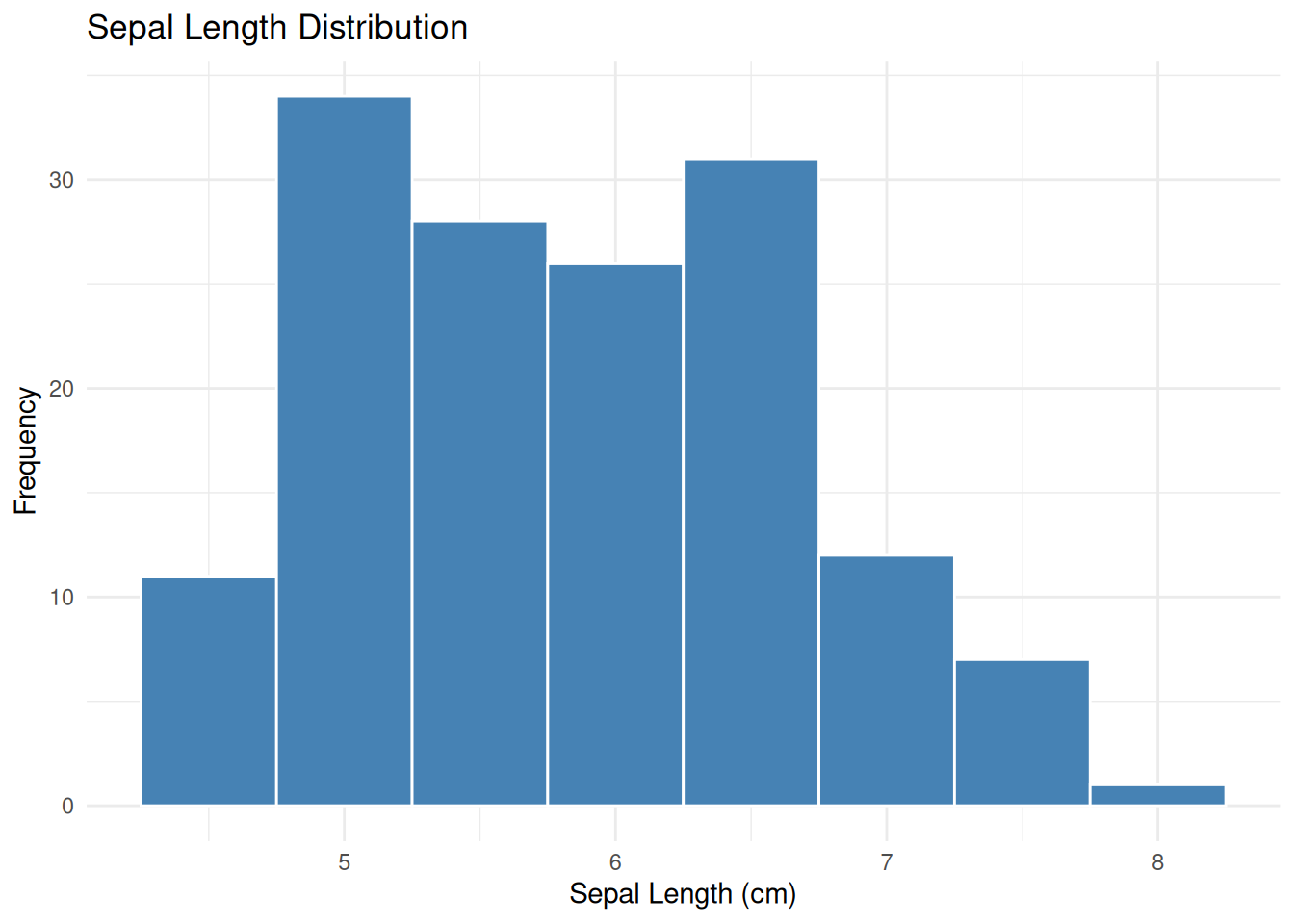
1.7.2 Histogram

ggplot(iris_data, aes(x = `sepal.length`)) +
  geom_histogram(binwidth = 0.5, fill = "steelblue", color = "white") +
  labs(title = "Sepal Length Distribution",
        x = "Sepal Length (cm)",
        y = "Frequency") +
  theme_minimal()

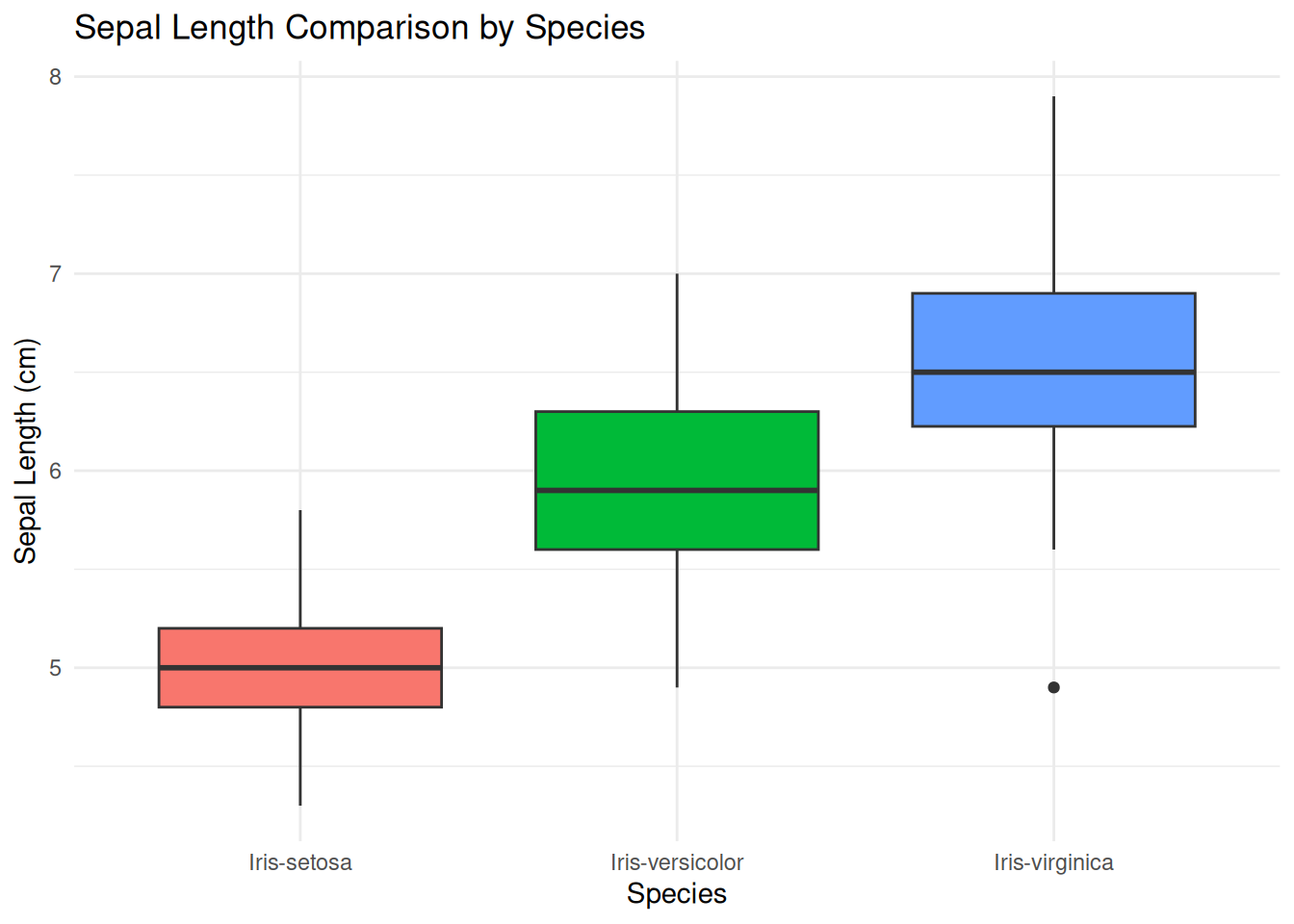
1.7.3 Boxplot

ggplot(iris_data, aes(x = `class`, y = `sepal.length`, fill = `class`)) +
  geom_boxplot() +
  labs(title = "Sepal Length Comparison by Species",
        x = "Species",
        y = "Sepal Length (cm)") +
  theme_minimal() +
  theme(legend.position = "none")

Think-aloud (I Do): “In ggplot2, I always start with ggplot(data, aes(...)) which specifies the data and aesthetic mapping (x and y). Then I add layers with geom_*geom_histogram() for distributions, geom_boxplot() for group comparisons. labs() adds titles and labels, theme_minimal() gives a clean appearance.”

1.8 Exercises (You Do)

Now it’s your turn! Follow these steps independently:

1.8.1 Exercise 1: Explore the Tapak Dara Dataset

  1. Load the morfologi_tapak_dara.tsv dataset:

    tapak_dara <- read.delim("assets/data/morfologi_tapak_dara.tsv")
  2. Inspect the data structure:

    str(tapak_dara)
    summary(tapak_dara)
  3. Create a histogram for the plant.height variable:

    ggplot(tapak_dara, aes(x = plant.height)) +
      geom_histogram(binwidth = 5, fill = "forestgreen", color = "white") +
      labs(title = "Tapak Dara Plant Height Distribution",
           x = "Plant Height (cm)",
           y = "Frequency") +
      theme_minimal()

1.8.2 Exercise 2: Group Comparison

  1. Create a boxplot of plant.height by location (label):

    ggplot(tapak_dara, aes(x = label, y = plant.height, fill = label)) +
      geom_boxplot() +
      labs(title = "Plant Height Comparison by Location",
           x = "Location",
           y = "Plant Height (cm)") +
      theme_minimal() +
      theme(legend.position = "none")
  2. Calculate descriptive statistics per group:

    tapak_dara %>%
      group_by(label) %>%
      summarise(
        n = n(),
        mean_height = mean(plant.height),
        sd_height = sd(plant.height)
      )

1.8.3 Exercise 3: Challenges

Try creating different visualizations from the iris dataset:
- Histogram for petal width
- Boxplot of petal length by species
- Scatter plot of sepal length vs sepal width colored by species

1.9 Summary

In this session, we have learned:
- The four RStudio panels and their functions
- Objects and assignment with <-
- Basic data types: numeric, character, factor, logical
- Reading data with read.delim()
- Inspecting data with str(), summary(), head()
- Subsetting data with $, [ ], and dplyr::filter()
- Basic visualization with ggplot2: histograms and boxplots

In the next session, we will use these skills to perform more in-depth statistical analysis — starting with the T-test.